Configuration File Explanation
This section mainly introduces the training parameter settings in cfgs/train/train_base.py. It defines the base training configuration, and all other training configuration files should inherit from this file.
The configuration file uses Python syntax and supports OmegaConf and Hydra extension syntax.
For example, referencing other values within the configuration:
dict(
    total_steps = 1000,
    train=dict(
        train_steps='${total_steps}', # Root path reference
        save_step='${.train_steps}'   # Reference within the same level
    ),
    save_step = '${train.train_steps}', # Root path reference
)
Note
For other advanced usage, refer to the RainbowNeko Engine Configuration Guide
Overall Training Configuration
# Import necessary Python packages
import time
from functools import partial

import torch
from torch.nn import MSELoss

from rainbowneko.ckpt_manager import ckpt_saver
from rainbowneko.loggers import CLILogger
from rainbowneko.utils import ConstantLR
from rainbowneko.parser import neko_cfg
from hcpdiff.loss import DiffusionLossContainer

# You can define global variables
time_format="%Y-%m-%d-%H-%M-%S"

@neko_cfg # Only functions decorated with @neko_cfg will be compiled into configuration
def make_cfg(): # make_cfg is the entry point of the configuration file; the parser reads and uses the return value as the configuration
    return dict(
        exp_dir=f'exps/{time.strftime(time_format)}', # Directory to save experiment data
        mixed_precision=None, # Precision used for training; supports fp32, fp16, bf16, fp8. None means fp32.
        allow_tf32=True, # Enable TF32 to accelerate training
        seed=114514, # Random seed for training; fixing the seed helps with reproducibility

        ckpt_saver=dict( # Model checkpoint saver
            model=ckpt_saver() # The default saver saves all models and plugins
        ),

        train=dict(
            train_steps=1000, # Total number of training steps
            train_epochs=None,  # Total number of training epochs; has higher priority than train_steps
            gradient_accumulation_steps=1, # Gradient accumulation steps
            workers=4, # Number of worker processes for data loading
            max_grad_norm=1.0, # Gradient clipping
            set_grads_to_none=False, # Whether to set gradients to None to save memory
            retain_graph=False, # Whether to retain the computation graph
            save_step=100, # Interval (in steps) to save the model

            resume=None, # Path to resume training from a previous checkpoint

            loss=DiffusionLossContainer(MSELoss(reduction='none')), # Loss function, default is MSE loss
            optimizer=torch.optim.AdamW(_partial_=True, weight_decay=1e-2), # Optimizer
            scale_lr=False,  # Automatically scale learning rate based on batch size
            scheduler=ConstantLR( # Learning rate scheduler
                _partial_=True,
                warmup_steps=500,
            ),

            metrics=None,  # Evaluation metrics during training
        ),

        logger=[
            partial(CLILogger, out_path='train.log', log_step=20), # Logger that outputs to console
        ],

        model=dict(
            name='model', # Model name used when saving

            enable_xformers=False, # Whether to enable xformers optimization
            gradient_checkpointing=True, # Whether to enable gradient checkpointing to save memory
            force_cast_precision=False, # Whether to forcibly cast precision to save memory at the cost of accuracy
            ema=None, # Whether to use EMA (Exponential Moving Average) model to improve performance

            wrapper=None, # Model wrapper
        ),

        evaluator=None, # Evaluator during training; can be used for previewing images or evaluating the model
        data_train=None, # Training dataset configuration
    )
Tip
You can inherit the base configuration by adding _base_=[train_base] in your new configuration. Simply override or add the parts you need. Overrides are applied recursively at the same level. To completely replace a node, add _replace_=True within that node.
Learning Rate Schedulers
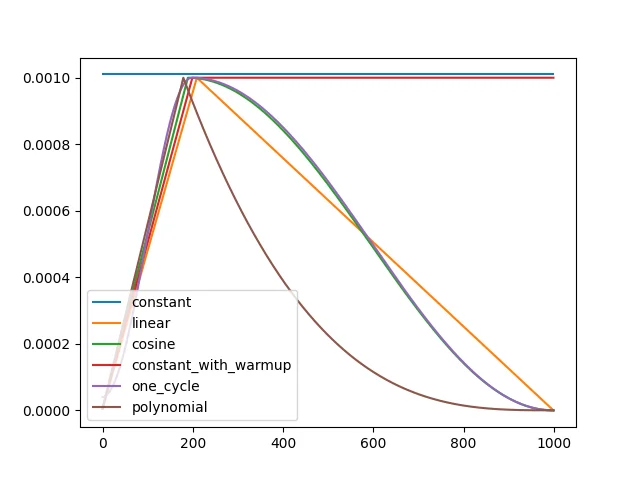
The chart above shows how different learning rate strategies evolve over training steps. It is recommended to use either one_cycle or constant_with_warmup.
The warmup phase is controlled by warmup_steps, and the total training steps are defined by training_steps (default is total training steps).
Supported Learning Rate Schedulers
constant and constant_with_warmup Fixed learning rate
from rainbowneko.utils.lr_scheduler import ConstantLR

ConstantLR(
    _partial_=True,
    warmup_steps=200, # Number of warmup steps
)
cosine Cosine annealing learning rate
from rainbowneko.utils.lr_scheduler import CosineLR

CosineLR(
    _partial_=True,
    warmup_steps=200, # Number of warmup steps
    # num_cycles=0.5, # Number of cycles, default is 0.5 as shown in the chart
)
one_cycle Cosine increase followed by cosine decay
from rainbowneko.utils.lr_scheduler import OneCycleLR

OneCycleLR(
    _partial_=True,
    warmup_steps=200, # Number of warmup steps

    # Optional parameters
    # div_factor=, # max_lr / initial_lr
    # final_div_factor=, # max_lr / final_lr
)
polynomial Polynomial decay learning rate
from rainbowneko.utils.lr_scheduler import PolynomialLR

PolynomialLR(
    _partial_=True,
    warmup_steps=200, # Number of warmup steps
    lr_end=1e-7, # Final learning rate
    power=1.0 # Power of the polynomial
)
MultiStepLR Step-wise learning rate decay
from rainbowneko.utils.lr_scheduler import MultiStepLR

MultiStepLR(
    _partial_=True,
    step_rules='1:100,0.1:200,0.01:300,0.005' # LR=1 before step 100, 0.1 from 100–200, 0.01 from 200–300, 0.005 after 300
)
CosineRestartLR Cosine annealing with restarts
from rainbowneko.utils.lr_scheduler import CosineRestartLR

CosineRestartLR(
    _partial_=True,
    warmup_steps=200, # Number of warmup steps
    num_cycles=5, # Number of restart cycles
)
Note
The optimizer and training_steps parameters will be automatically provided by the framework.
Model Configuration
The model body is defined in model.wrapper. You can use any model wrapper or define a custom one.
from rainbowneko.ckpt_manager import NekoLoader, LocalCkptSource
from hcpdiff.ckpt_manager import DiffusersSD15Format
from hcpdiff.models import SD15Wrapper

wrapper=SD15Wrapper.from_pretrained( # Initialize from a pre-trained model
    _partial_=True,
    models=NekoLoader(
        format=DiffusersSD15Format(), # Model format
        source=LocalCkptSource(),     # Use local source
    ).load(
        path='Lykon/DreamShaper',     # Path to the pre-trained model
        _partial_=True
    )
),
Note
For detailed configuration of models, see Model Format Guide
from hcpdiff.easy import SD15_auto_loader
from hcpdiff.models import SD15Wrapper

wrapper=SD15Wrapper.from_pretrained(
    _partial_=True,
    models=SD15_auto_loader(
        ckpt_path='Lykon/DreamShaper', # Path to the pre-trained model
        _partial_=True
    ),
),
Note
For detailed configuration of models, see Model Format Guide
Loss Configuration
To add Min-SNR weighting to the loss:
from torch import nn
from hcpdiff.loss import MinSNRWeight, DiffusionLossContainer

loss=MinSNRWeight(
    DiffusionLossContainer(nn.MSELoss()),
    gamma=5, # Parameter for Min-SNR
)
To use SSIM loss:
from hcpdiff.loss import SSIMLoss, DiffusionLossContainer

loss=DiffusionLossContainer(SSIMLoss())
Let me know if you need help translating other parts of the documentation or have questions about specific configurations!