Training
HCP-Diffusion supports configuring various components used in different training stages through Python configuration files.
These include model architectures, training parameters and strategies, dataset configurations, and more.
Basic Training Configuration
Basic training configuration files and examples can be found in the cfgs/train directory.
All training configuration files should inherit both train_base.py and tuning_base.py.
train_base.py: Defines the hyperparameters and dataset configurations required during training.tuning_base.py: Defines the model architecture and training parameters used during training, specifying which model parameters and plugins to train, and how to apply LoRA to various layers.
hcp_train_1gpu --cfg cfgs/train/py/config_file.py
You can override values in the configuration file via CLI:
hcp_train_1gpu --cfg cfgs/train/py/config_file.py model.wrapper.models.ckpt_path=pretrained_model_path data_train.dataset1.batch_size=8
For multi-GPU training, specify the GPU IDs and number of GPUs in cfgs/launcher/multi.yaml, then run:
hcp_train --cfg cfgs/train/py/config_file.py
You can override values in the configuration file via CLI:
hcp_train --cfg cfgs/train/py/config_file.py model.wrapper.models.ckpt_path=pretrained_model_path data_train.dataset1.batch_size=8
Model Configuration
Base Model Configuration
The base model is configured in the model section. The structure is defined under model.wrapper, where you can initialize a model, such as loading a pretrained SD1.5 model:
from hcpdiff.models import SD15Wrapper
from hcpdiff.easy import SD15_auto_loader

wrapper=SD15Wrapper.from_pretrained(  # Model wrapper
    _partial_=True,
    models=SD15_auto_loader(ckpt_path='Lykon/DreamShaper', _partial_=True),  # Simplified pretrained model loader
),
Note
You can also load the model using lower-level APIs. See Model Format Documentation for details.
Replacing VAE
You can specify a different VAE module in the wrapper:
from hcpdiff.models import SD15Wrapper
from hcpdiff.easy import SD15_auto_loader
from diffusers import AutoencoderKL

wrapper=SD15Wrapper.from_pretrained(  # Model wrapper
    _partial_=True,
    models=SD15_auto_loader(
        ckpt_path='Lykon/DreamShaper',
        vae=AutoencoderKL.from_pretrained('vae/'),
        _partial_=True
    ),
),
You can also use a single VAE checkpoint file:
from hcpdiff.models import SD15Wrapper
from hcpdiff.easy import SD15_auto_loader
from diffusers import AutoencoderKL

wrapper=SD15Wrapper.from_pretrained(  # Model wrapper
    _partial_=True,
    models=SD15_auto_loader(
        ckpt_path='Lykon/DreamShaper',
        vae=AutoencoderKL.from_single_file('vae.ckpt'),
        _partial_=True
    ),
),
Dataset Configuration
HCP-Diffusion supports multiple parallel datasets. For each training step, one batch is sampled from each dataset independently for forward and backward propagation. Their gradients are then summed.
Because each dataset is processed independently, image sizes and formats may differ. You can adjust the proportion and weight of each dataset using batch_size and loss_weight.
Example:
from hcpdiff.data import TextImagePairDataset

data_train=dict(
    dataset1=TextImagePairDataset(_partial_=True, batch_size=4, loss_weight=1.0,
        ...
    ),
    dataset2=TextImagePairDataset(_partial_=True, batch_size=1, loss_weight=1.0,
        ...
    ),
)
Tip
If the importance of dataset1 and dataset2 is in ratio a:b, then they should satisfy:
\(\frac{batch\_size_1 \times loss\_weight_1}{batch\_size_2 \times loss\_weight_2} = \frac{a}{b}\)
For a detailed explanation, see RainbowNeko Engine Dataset Configuration
Data Sources
Each dataset can define multiple data sources. All sources within a dataset will be bucketed, shuffled, and processed together—effectively merging them.
Example:
from hcpdiff.data import TextImagePairDataset, Text2ImageSource

dataset1=TextImagePairDataset(_partial_=True, batch_size=4, loss_weight=1.0,
    source=dict(
        data_source1=Text2ImageSource(
            img_root='imgs1/',
            label_file='${.img_root}',  # Label file path (same as image root)
            prompt_template='prompt_template/caption.txt',  # Prompt template
            repeat=1,  # Repeat the dataset N times to adjust its weight
        ),
        data_source2=Text2ImageSource(
            img_root='imgs2/',
            label_file='${.img_root}',
            prompt_template='prompt_template/caption.txt',
        ),
    ),
    ...
)
See more at RainbowNeko Engine Data Source Configuration
Buckets
Buckets group images with similar characteristics into the same batch.
Supported bucket types include:
FixedBucket: Resize and crop all images to a fixed resolution.
from rainbowneko.data import FixedBucket
FixedBucket(
    target_size=[512, 512]  # Use a fixed resolution of 512x512
)
RatioBucket (ARB): Group images by aspect ratio. Each batch can have a different ratio.
From ratios:
from rainbowneko.data import RatioBucket
RatioBucket.from_ratios(
    target_area=512*512,
    num_bucket=6,

    # Optional:
    step_size=8, # Step size for bucket
    ratio_max=4, # Maximum aspect ratio
    pre_build_bucket='path.pkl',  # Save buckets for reuse
)
From files:
from rainbowneko.data import RatioBucket
RatioBucket.from_files(
    target_area=512*512,
    num_bucket=6,

    step_size=8,
    pre_build_bucket='path.pkl',
)
SizeBucket: Group images by resolution. Each batch may have different sizes.
From files:
from rainbowneko.data import SizeBucket
SizeBucket.from_files(
    num_bucket=6,
    step_size=8,
    pre_build_bucket='path.pkl',
)
LongEdgeBucket: Resize images by the long edge, then group by resolution.
From files:
from rainbowneko.data import LongEdgeBucket
LongEdgeBucket.from_files(
    target_edge=800,
    num_bucket=6,
    step_size=8,
    pre_build_bucket='path.pkl',
)
Advanced Dataset Configurations
Adding a Regularization Dataset
Use a regularization dataset for DreamBooth, or to help the model retain its original generative ability when learning from self-generated images.
First, prepare a prompt dataset and generate images using the workflow:
hcp_run --cfg cfgs/workflow/text2img_dataset.py
Specify the model and prompt dataset in the configuration file.
Note
The prompt dataset format is the same as a regular dataset, just without images.
Using Prompt Templates
Prompt templates allow placeholders to be replaced by specified text during training.
For example:
a photo of a {pt1} on the {pt2}, {caption}
Here, {pt1} and {pt2} will be replaced by TemplateFillHandler with the specified words, which can be either pretrained tokens or custom embeddings.
Example:
from hcpdiff.data.handler import TemplateFillHandler

TemplateFillHandler(
    word_names={
        'pt1': 'my-cat',
        'pt2': 'sofa',
    },
)
Important
Recommended: Use the simplified Stable Diffusion handler:
from hcpdiff.data import StableDiffusionHandler
handler=StableDiffusionHandler(
    bucket=RatioBucket,
    word_names={
        'pt1': 'my-cat',
        'pt2': 'sofa',
    },
    erase=0,
),
During training, {pt1} will be replaced with the embedding for my-cat, {pt2} with sofa, and {caption} with the image caption (if available).
Fine-tuning Configuration
Fine-tuning can be applied to various components, commonly UNet and text encoder. You can assign different learning rates to different parts.
Example:
from rainbowneko.parser import CfgWDModelParser

model_part=CfgWDModelParser([
        dict(
            lr=1e-5,
            layers=['denoiser'],  # Train U-Net
            # layers=['TE'],      # Or train TextEncoder
        )
    ],
    weight_decay=1e-2  # Default weight decay
),
Note
The layer names should match the module paths in model.named_modules() (PyTorch format). Regex can be used, e.g., re:denoiser\..*\.attn1$ for all self-attention layers in UNet.
Model configuration follows the RainbowNeko Engine system. See RainbowNeko Engine Configuration
Training Multiple Parts with Different Learning Rates
Same learning rate for UNet and text encoder:
from rainbowneko.parser import CfgWDModelParser

model_part=CfgWDModelParser([
        dict(
            lr=1e-5,
            layers=[
                'denoiser',
                'TE',
            ],
        ),
    ],
    weight_decay=1e-2
),
Different learning rates:
from rainbowneko.parser import CfgWDModelParser

model_part=CfgWDModelParser([
        dict(
            lr=1e-5,
            layers=['denoiser'],
        ),
        dict(
            lr=2e-6,
            layers=['TE'],
        )
    ],
    weight_decay=1e-2
),
Prompt-tuning Configuration
Prompt-tuning trains word embeddings, with each embedding possibly covering multiple token positions.
First, create the custom word:
python -m hcpdiff.tools.create_embedding pretrained_model_path word_name token_length [--init_text initial_word]
# Random init: --init_text *[std, token_len]
# Partial init: --init_text cat, *[std, token_len], tail
Specify the word to train with emb_pt:
from hcpdiff.parser import CfgEmbPTParser
emb_pt=CfgEmbPTParser(
    emb_dir='embs/',
    cfg_pt={
        'pt-paimeng': dict(lr=0.003, weight_decay=1e-2)
    }
),
LoRA Training Configuration
LoRA can be applied to any Linear or Conv2d layer.
The configuration is similar to fine-tuning, but LoRA is added as a plugin:
from rainbowneko.parser import CfgWDPluginParser
from hcpdiff.models.lora_layers_patch import LoraLayer
model_plugin=CfgWDPluginParser(cfg_plugin=dict(
    lora1=LoraLayer.wrap_model(
        _partial_=True,  # Required
        lr=1e-4,  # Learning rate for this plugin
        rank=4,  # LoRA dimension
        alpha=2,  # LoRA weight
        layers=[
            're:denoiser.*\.attn.?$',  # Attention layers
            're:denoiser.*\.ff$',      # FeedForward layers
        ]
    )
), weight_decay=0.1),  # Default weight decay for all plugins
Advanced Configuration
Loss Weight Mask (Assigning different importance to image regions)
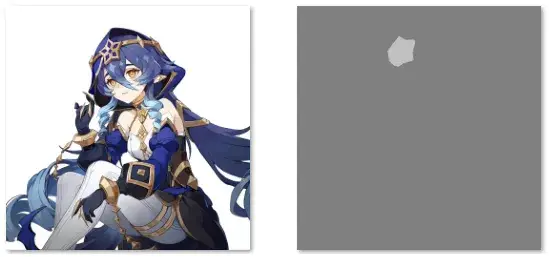
When training data is limited, the model may struggle to learn important features.
You can use a loss mask to guide the model to focus more (or less) on specific areas during training.
Loss masks and original images should be placed in separate folders with the same filenames.
The grayscale brightness of the mask determines the attention multiplier:
| Brightness | 0% | 25% | 50% | 75% | 100% |
|---|---|---|---|---|---|
| Multiplier | 0% | 50% | 100% | 300% | 500% |
CLIP Skip
Some models skip a few CLIP blocks during training.
Set the clip_skip value in the TE_hook_cfg parameter under model.wrapper.
Default is 0 (equivalent to clip skip=1 in webui), meaning no blocks are skipped.
Tip
To skip one block:
TE_hook_cfg=TEHookCFG(clip_skip=1)